
Valentina Akpan: Founder of Rellatech, providing administrative and operations support to executives, founders, business owners and teams. Her background combines technical support, customer success, administration and operations.
A meeting can end with everyone agreeing on what needs to happen, but by the time the next one comes around, someone is still waiting for a document, an approval has not come through, and nobody is quite sure who was meant to follow up.
When people return to their inboxes and other responsibilities, the work discussed during the meeting can easily get pushed aside, especially if the next steps are sitting inside a long set of notes that nobody has opened again.
Keeping meeting follow-ups organized starts with making it easy to see what was agreed, who is responsible and what needs to happen next, without asking everyone to remember the conversation.
Make the next step clear enough for someone to act on
Meeting notes are useful for recording a discussion, but an action needs enough detail for the person handling it to know what they are expected to do.
For example, a note that says “follow up on the proposal” leaves several questions unanswered, including which proposal it refers to, who needs to receive it and whether it is ready to send.
In a sample project meeting, that action could be written as:
Maya will update the proposal with the agreed delivery dates and send it to Daniel for review by Thursday, so he can approve it before it goes to the client.
That gives both people a clearer understanding of their part in the work, while also showing that preparing the proposal and approving it are separate steps.
If the meeting ends without an owner or a date being agreed, those details should be confirmed with the people involved before they are added to the tracker.
Keep the actions somewhere people can find them
When follow-ups are spread across meeting notes, emails and chat messages, finding an update can take longer than making the update itself.
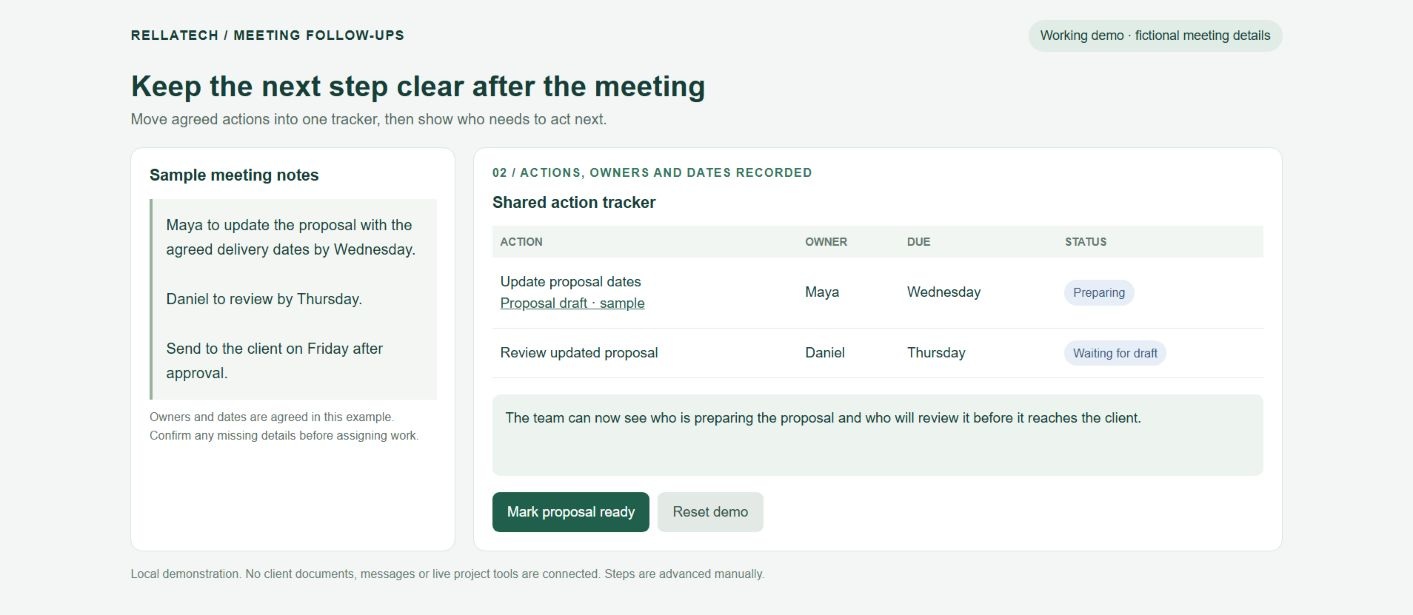
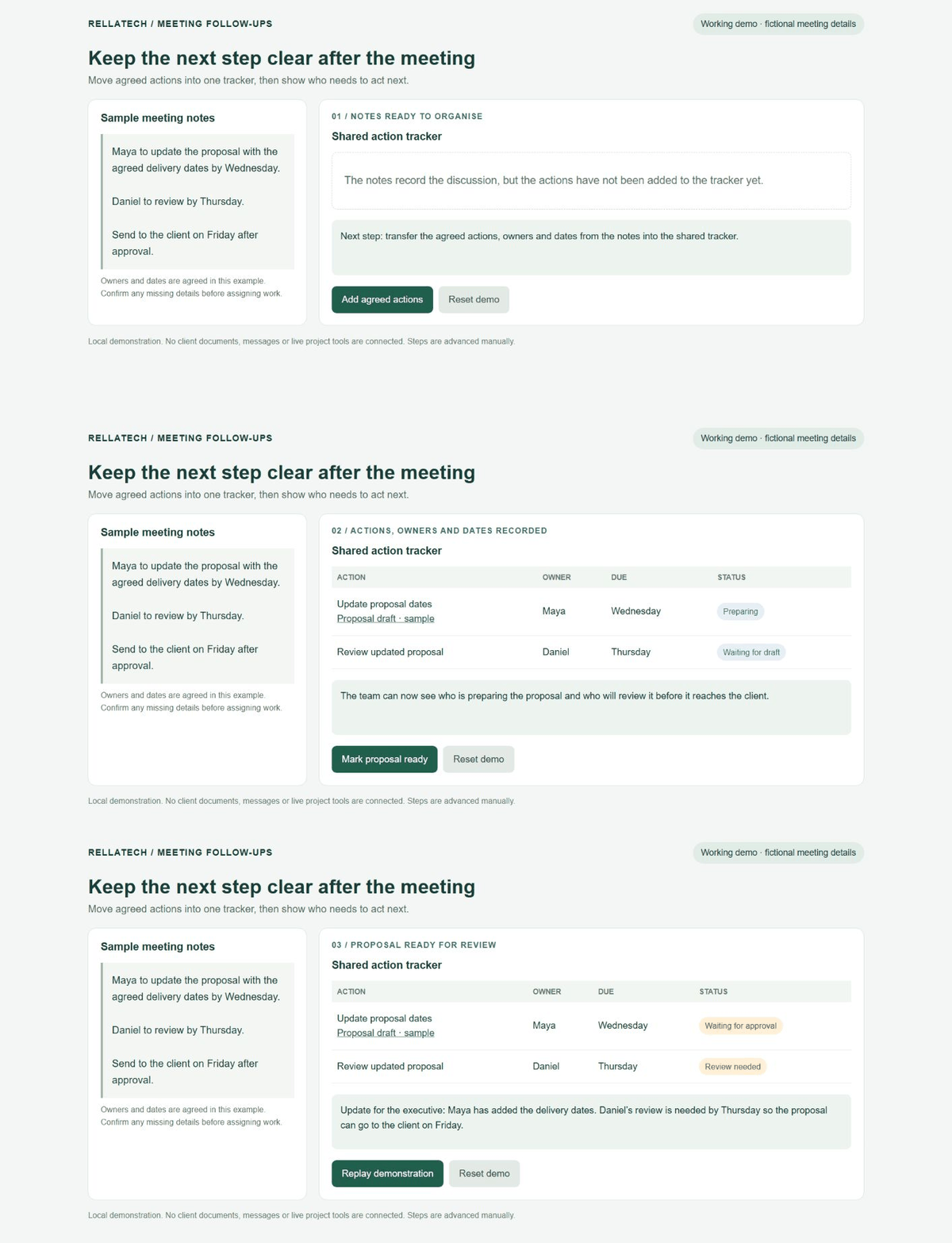
A shared action tracker gives the team one place to check, whether that is a spreadsheet or the project management tool they already use. The useful details are usually the action, the person responsible, the agreed date, its current status and a link to any document needed to complete it.
It also helps to include what the task is waiting for, because “in progress” does not tell you whether someone is actively working on it or has been unable to continue for several days.
For the proposal example, the update might say:
The delivery dates have been added, and the proposal is waiting for Daniel’s review. Maya sent the document link on Wednesday, with approval needed by Thursday afternoon.
Anyone checking the tracker can now see where the work stands and who needs to act, without searching through the original conversation.
Follow up with the person who can move the work forward
A reminder is more useful when it explains what is needed and gives the person enough information to respond, rather than asking the whole team whether there are any updates.
If a document is waiting for approval, the follow-up should go to the reviewer with the correct link, the agreed date and a short explanation of what depends on their response.
For example:
Hi Daniel, the updated proposal is ready for your review, and I’ve included the link below. We agreed to send it to the client on Friday, so please let me know whether you can review it by Thursday afternoon or whether we need to adjust the plan.
This gives Daniel a clear request and a way to flag a delay, while keeping the conversation focused on what needs to happen next.
The timing of reminders should fit the work and the arrangements agreed with the team, especially when people work across different time zones or need time to review longer documents.
Keep decisions connected to the work they affect
Sometimes a task changes because the team has made a new decision, but the tracker still shows the original instructions.
If a client asks for a different delivery date or an executive changes the scope of a proposal, the action record should be updated so the person doing the work is following the latest agreement.
A short note explaining what changed, when it was agreed and where to find the supporting email or document can prevent confusion later. It also gives someone joining the project enough context to understand why the work is being handled that way.
When an action is complete, adding the final document or a brief completion note makes the record more useful than simply changing its status to “done.”
Use the tracker to prepare for the next meeting
Before the next meeting, the person coordinating the follow-ups can review the open actions and prepare a short update showing what has been completed, what is waiting and which items need a decision.
That allows the meeting to focus on the work that needs discussion, while the routine updates are already available for everyone to read.
If an action keeps appearing without moving forward, it is worth checking whether the owner has the information, access or approval needed to complete it, or whether the task itself needs to be changed.
For a busy founder or executive, having someone maintain these details means they can see where their attention is needed without personally chasing every person involved.
Through Rellatech, I provide administrative and executive support, including meeting preparation, notes, action tracking and follow-ups. If keeping track of what happens after your meetings is taking up too much of your week, tell me what your team needs help with, and we can agree on the support that would be useful.
Related Services